Capture larger groups directly in the widget — no calls or emails needed.
👉 Guests can submit a request when they exceed max party size
👉 Easy handling — confirm or suggest an alternative time
With the new Booking Request feature, restaurants can easily capture larger parties that otherwise wouldn’t have been able to book through the widget.
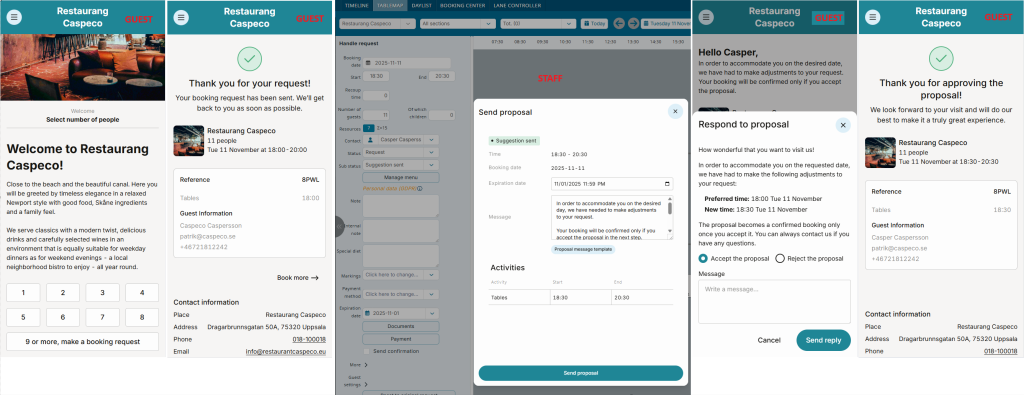
Instead of the booking flow stopping in the widget when the party size exceeds the configured maximum and the guest is directed to email, phone, or an external form, the guest can now submit a request directly in the widget. The restaurant can then easily confirm the request or suggest an alternative solution.
For guests, this means a smoother and more convenient experience—no need to switch channels just to make a request.
For the restaurant, it means a more streamlined way of handling requests for larger parties, with the added benefit of spending less time on phone calls and emails.
How it works
If activated, guests can send booking requests via the widget when they exceed your usual maximum party size.
Requests appear in the calendar on the requested day and on the dashboard “Home“under “Booking requests to handle”.
If you need to change something in a request to accommodate the party, send a proposal which the guest can accept or decline.
When the guest accepts: set “Approved by us” and send confirmation.
The booking request can of course be used as just a channel for receiving requests and for these to then be handled completely outside of the function’s integrated flows.
Benefits for your restaurant
✅ Saves time – Receive requests directly in the booking system
✅ Increased guest satisfaction – Guests can submit requests whenever they want
✅ Reduced risk of misunderstandings – Everything happens directly in the system, no emails or phone calls to manage
Which guests can use the feature?
Available to all restaurant and activity customers using the RMS platform and the new widget.
Limitations: Only works with the newest widget